The Complete Developer Guide to Salesforce B2C Commerce URL Rules
Learn how to configure URL syntax, manage redirects, handle search refinements, and troubleshoot conflict errors in Salesforce B2C Commerce.
In e-commerce, a URL is more than just a link in the browser bar. It is a critical path connecting your database to search engines (like Google) and your shoppers. Clean, short, and readable URLs mean better Search Engine Optimization (SEO) rankings, faster page loads, and fewer broken links.
Salesforce B2C Commerce provides a built-in URL Rules module to manage, clean, and optimize your storefront links. This guide is a complete reference for Indian developers, merchandisers, and technical architects to understand, set up, and deploy URL rules without breaking production.
1. The Basics: Standard URLs vs. Modern URL Rules
When a B2C Commerce site is freshly created, its native URLs are long and full of technical parameters. The URL Rules module cleans these up into human-readable strings.
Evolution of a URL
text❌ Long Standard URL (No optimization active):
http://www.myindiastore.in/on/demandware.store/Sites-IndiaRetail-Site/default/Search-Show?cgid=electronics-smartphones-android

⚠️ Old Search-Friendly URL (Legacy SEO Support Module - Deprecated):
http://www.myindiastore.in/electronics-smartphones-android,default,sc.html

✅ Clean Rule-Based URL (Modern URL Rules Module):
http://www.myindiastore.in/electronics-smartphones-android
Why Clean URLs Matter for Google Ranking
Google penalizes websites with extra-long URLs, too many folders, or random symbols. Activating the modern URL Rules module helps your site rank better because it:
- Removes Platform Traces: It completely hides old file extensions like
sc.htmlorpg.html. - Shortens Paths: It turns long system paths into clear keywords that tell the shopper exactly where they are.
- Protects Branding: It strips out technical system terms like
demandwareorSFCC.store.
🛑 Critical Rule
You can only enable one module at a time. The modern URL Rules module and the old SEO Support module cannot run together. Enabling URL Rules automatically hides the old SEO support pages.
2. Where URLs Live and How the System Builds Them
To write good rules, you need to understand how Salesforce B2C Commerce processes and stores different types of links in its database.
Database Directory vs. On-The-Fly Assembly
The platform handles storefront links in two different ways:
- Stored in Database Directory
- Pipelines, Categories, Folders, and Search Refinements.
- The platform keeps a direct list of all category, folder, and pipeline links in the database for every language version of your site.
- Built on-the-fly (Dynamically)
- Products and Content Assets (Like Articles).
- Because online stores can have lakhs of products, saving each link in the database would slow down the system. Instead, the platform builds product links dynamically on-the-fly. It does this by reading the explicit Product ID or Content ID right from the end of the URL path (which requires an
.htmlending).
The URL Generation System Job
For links saved in the database directory (categories, pipelines, folders), a background system job runs automatically to build and cache the clean links.
- What Triggers It: The job wakes up and rebuilds the links whenever someone adds or deletes a category, changes site settings, changes a category name or ID, or alters language setups.
- Speed Benchmark: The background job takes about 3 minutes to process 50,000 categories or folders.
- Instance Rule: This background job only runs on Sandbox and Staging environments. It is completely blocked from running on live Production systems so it doesn't consume server memory. Production gets its clean URLs purely through data replication.
How the System Solves Conflicts
If the system job finds duplicate category links (for example, if you have two different categories named offers), B2C Commerce resolves this automatically by adding a number to the end, creating offers-1 and offers-2.
If a category name conflicts directly with a pipeline shortcut, it triggers a Global Conflict. You can check these on the URL Rules Page General Tab.
3. Step-by-Step Business Manager Setup
Configuring the URL Rules engine requires coordinating multiple tabs in Business Manager (BM). Here is the navigation map for each screen.
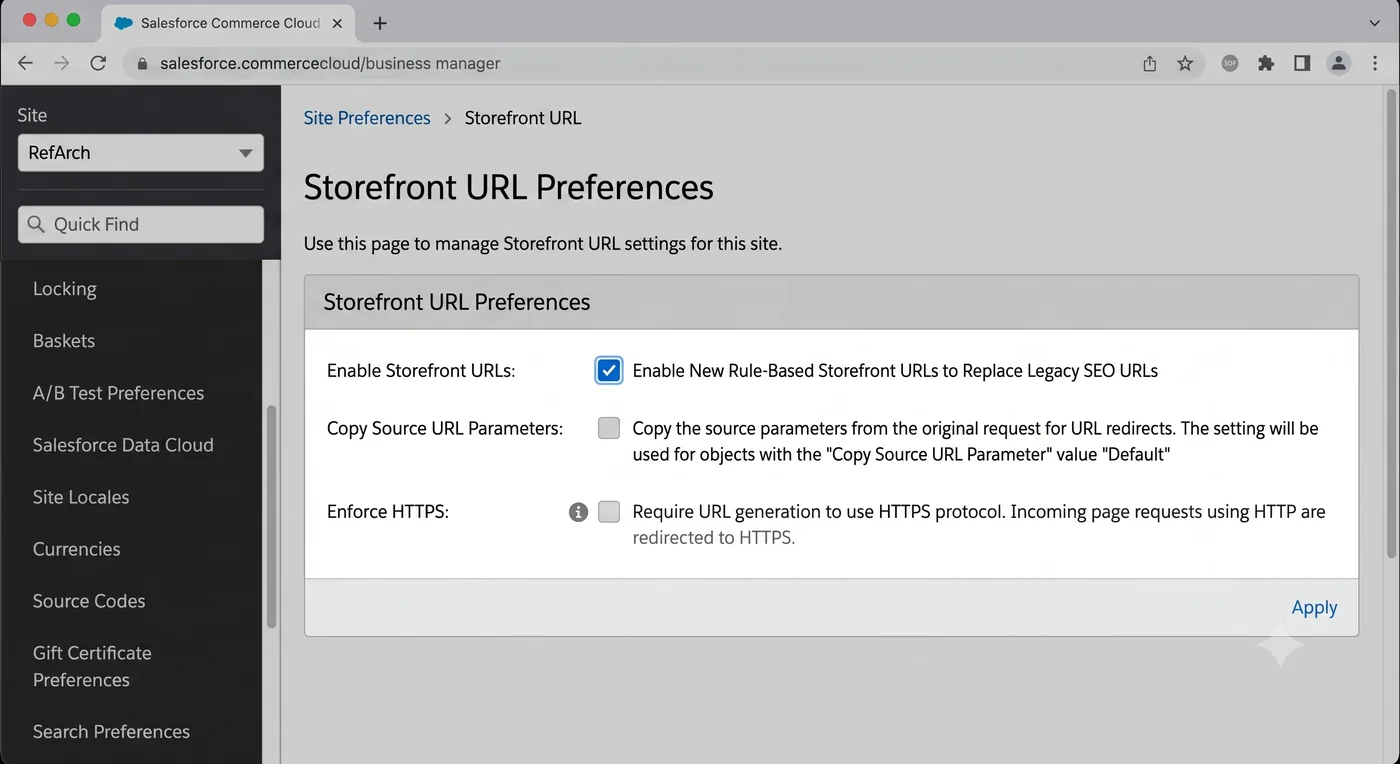
Screen 1: Activating the Module
textBM Navigation Path: Merchant Tools > Site Preferences > Storefront URLs
- What to do: Check the box that says Enable Storefront URL Rules and click Apply.
Screen 2: The General Tab (Monitoring and Controls)
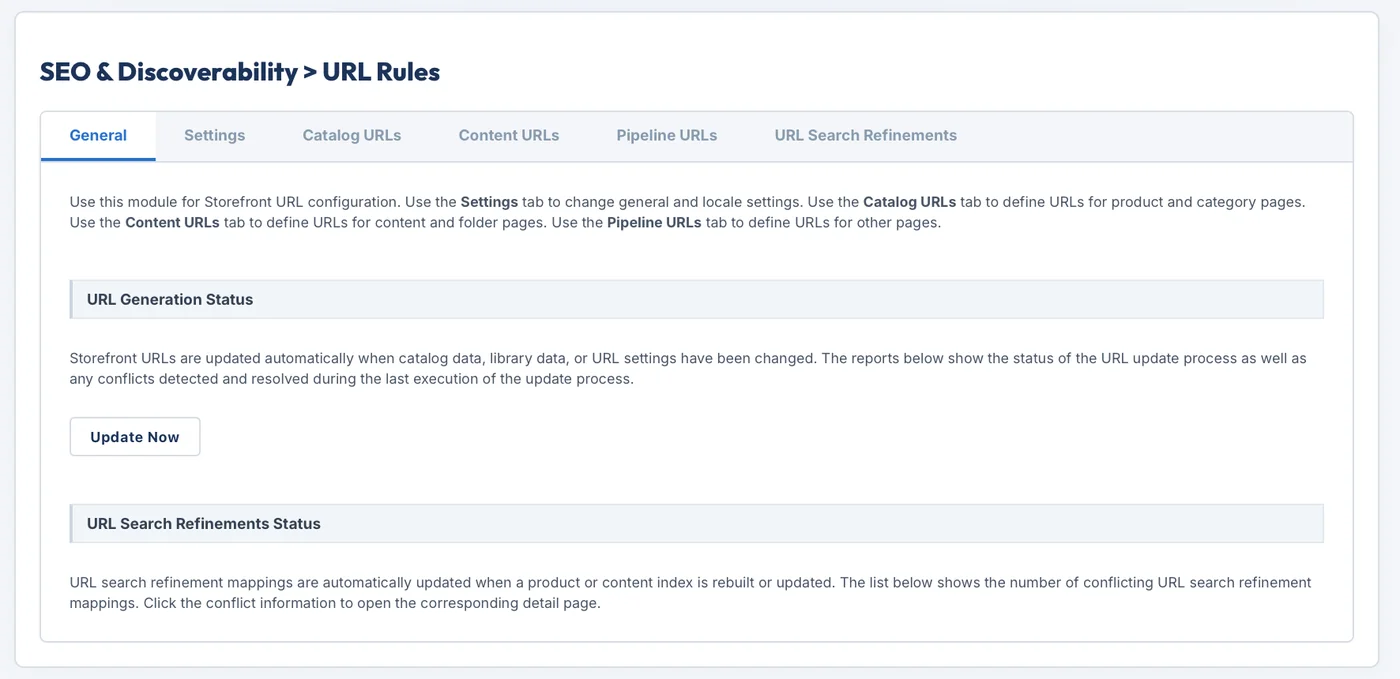
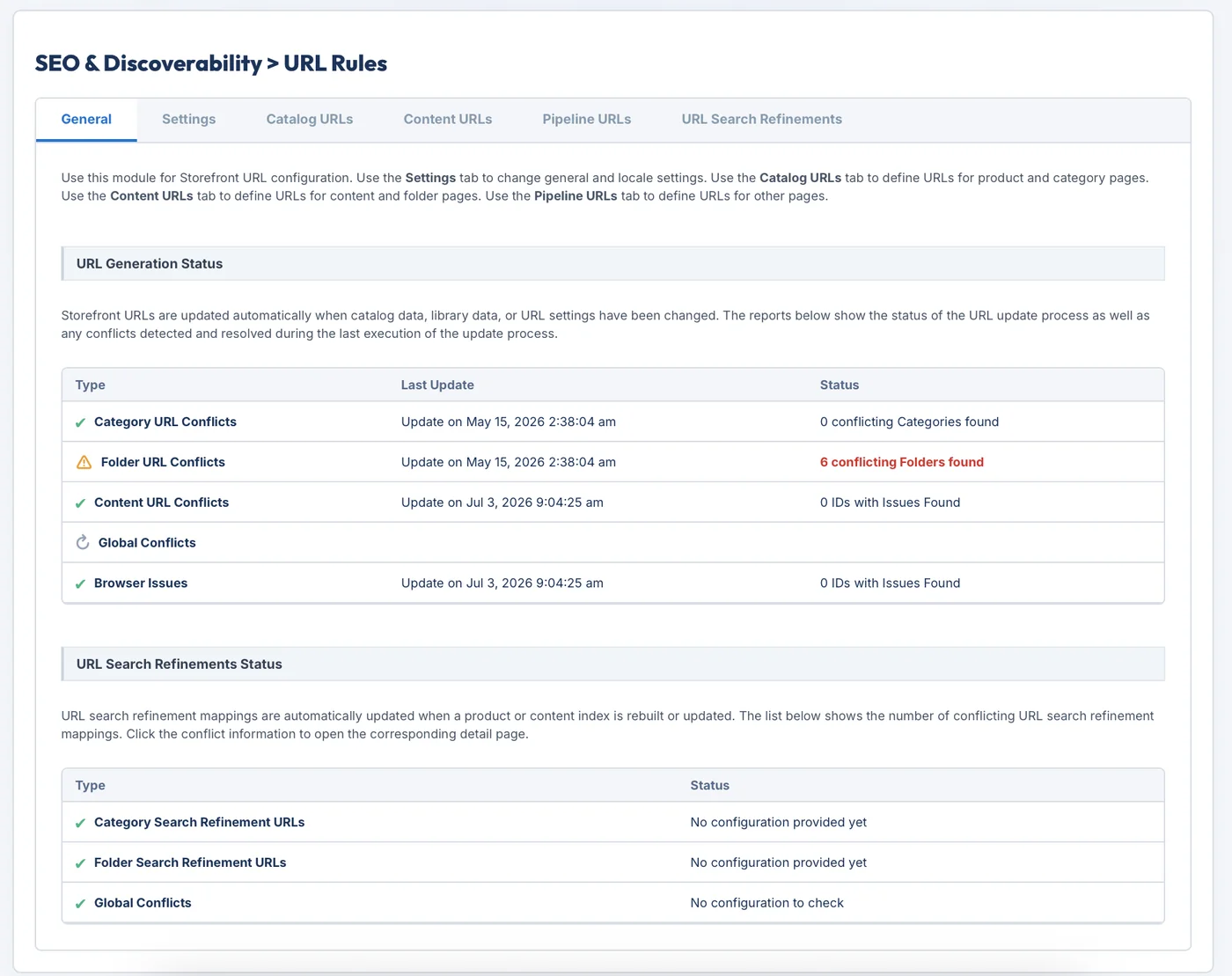
textBM Navigation Path: Merchant Tools > Site > SEO & Discoverability > URL Rules [General Tab]
- What to do: View the URL Generation Status and URL Search Refinements Status tables to find conflicts.
- Caching Rule: The conflict reports cache and expire after 5 minutes on Sandbox and Staging. On Production, the calculations do not cache; you must trigger them manually.
- Force Update: If you change settings in other tabs and want to see the results immediately, click the Run Update Now button to clear the cache and refresh the log.
Screen 3: The Settings Tab (Spaces, Capitalization, and Languages)
textBM Navigation Path: Merchant Tools > Site > SEO & Discoverability > URL Rules [Settings Tab]
- What to do: Configure rules for character changes, white spaces, and how languages are displayed in your links.
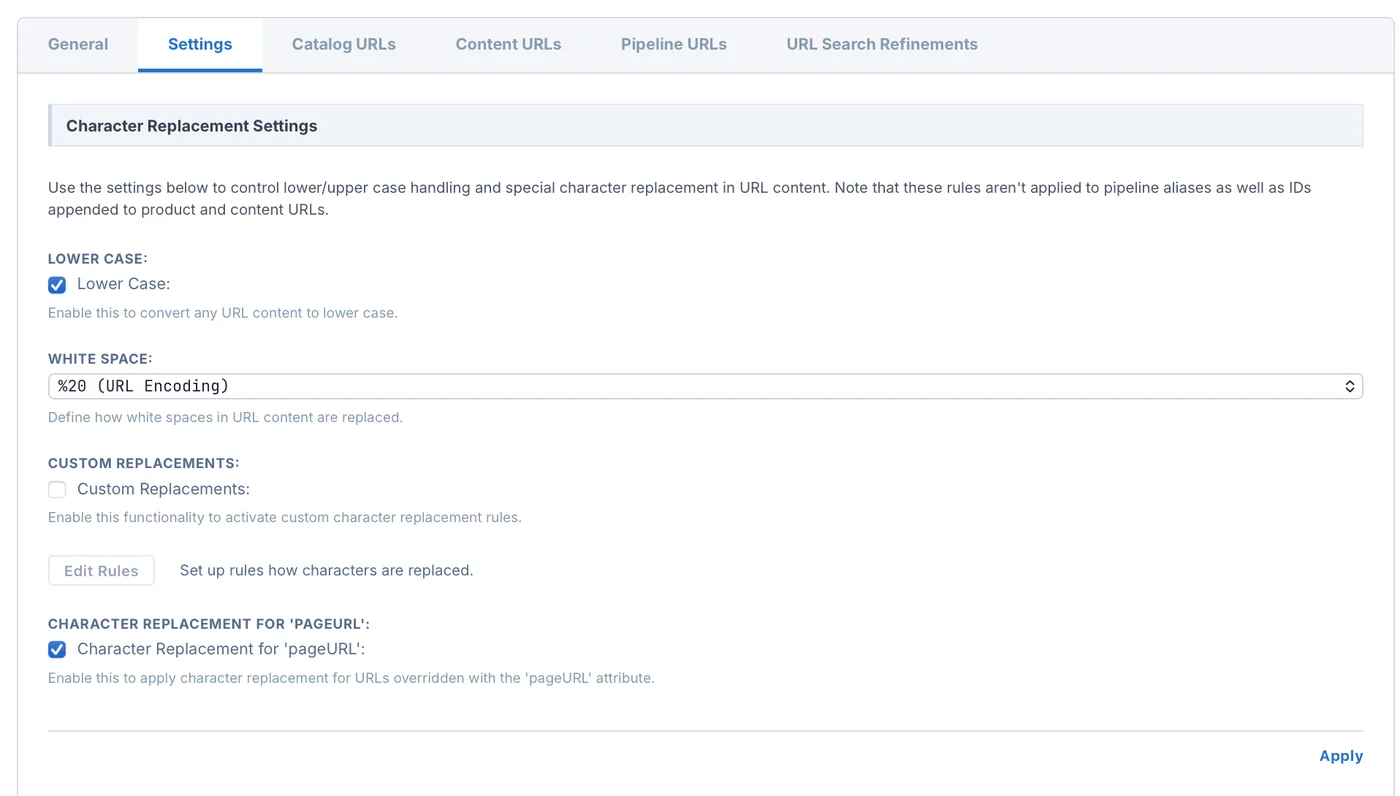
Character Replacement Settings
- Lower Case: Check this to force all product and category names in the URL to stay in lowercase. This stops Google from seeing capitalized variants as duplicate pages.
Note: This setting has no effect on Product IDs (e.g., product codes like
MOBI123andmobi123are treated exactly the same).
- White Space: Choose how the system replaces spaces in brand or product names. The platform allows URL Encoding (
%20), plus (+), underscore (_), minus/hyphen (-), or period (.). - Character Replacement for 'pageURL': Check this to apply your space and character rules even if a merchandiser manually overrides a product URL using the
pageURLattribute. (Turned on by default). - Custom Replacement Rules: Click Edit Rules to swap out special or non-ASCII characters (for example, mapping a character like
&to the wordand). If this is turned off, the system will convert special characters into random hex codes (like%26), which looks untidy.
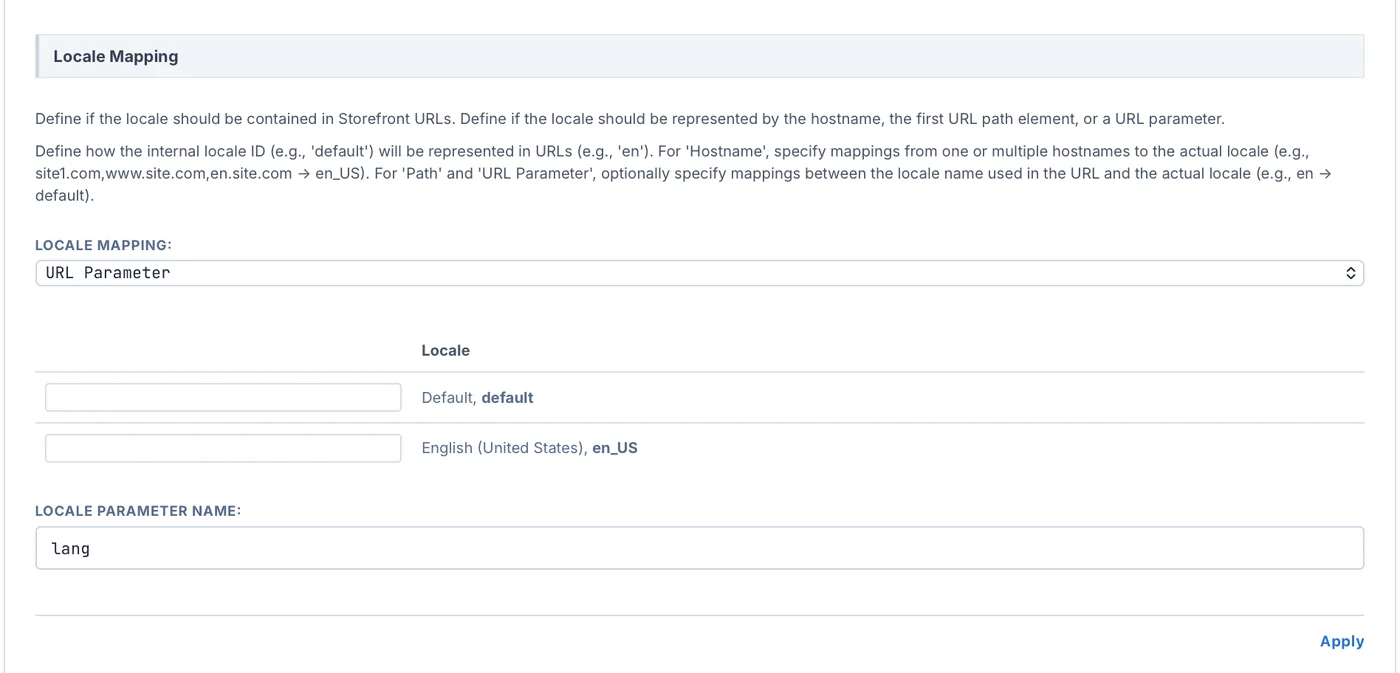
Locale-Mapping Settings (Handling Languages)
This tells the system how to embed language or country codes into your links.
- None: Used if your store has only one language (e.g., only English). No language codes appear in your URLs.
- Hostname: The language is tied to the domain name (e.g.,
hi.myindiastore.in/mens). You must configure these domains in your host alias file first. - URL Parameter: Appends the language code to the end as a query parameter (e.g.,
www.myindiastore.in/mens?lang=en_IN). - Path: Puts the language code right at the start of the URL path. It supports single values (e.g.,
/en/) or double paths (e.g.,/en/IN/).
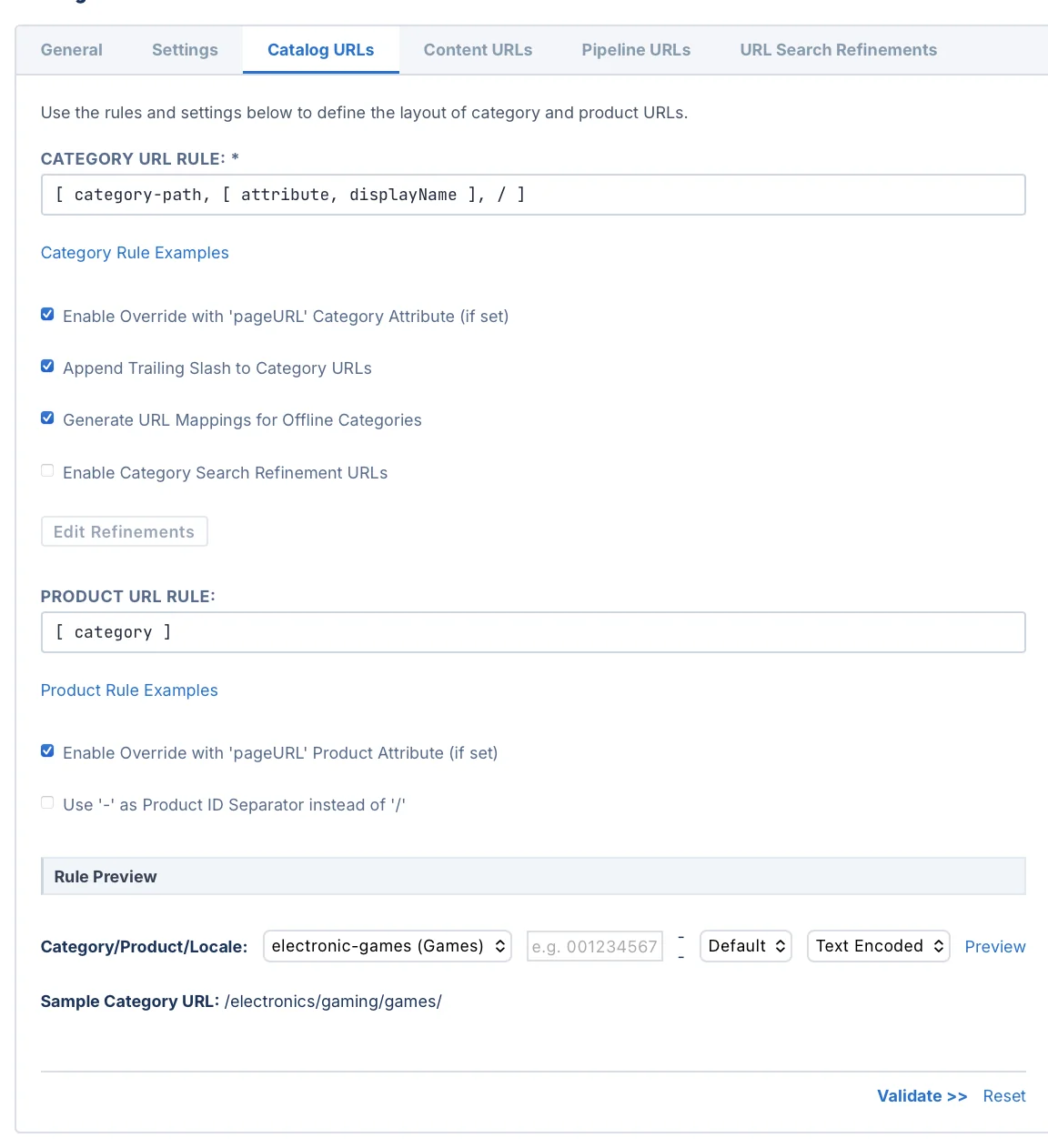
Screen 4: Catalog URLs and Content URLs Tabs (Writing the Patterns)
textBM Navigation Path: Merchant Tools > Site > SEO & Discoverability > URL Rules [Catalog URLs / Content URLs Tabs]
- What to do: This is where you write the explicit logic rules that dictate how category and product links are formatted.
- Previewing Links: Before saving a rule, select a category, click Browse to pick a sample product, select a language, and click Preview to see the final link layout.
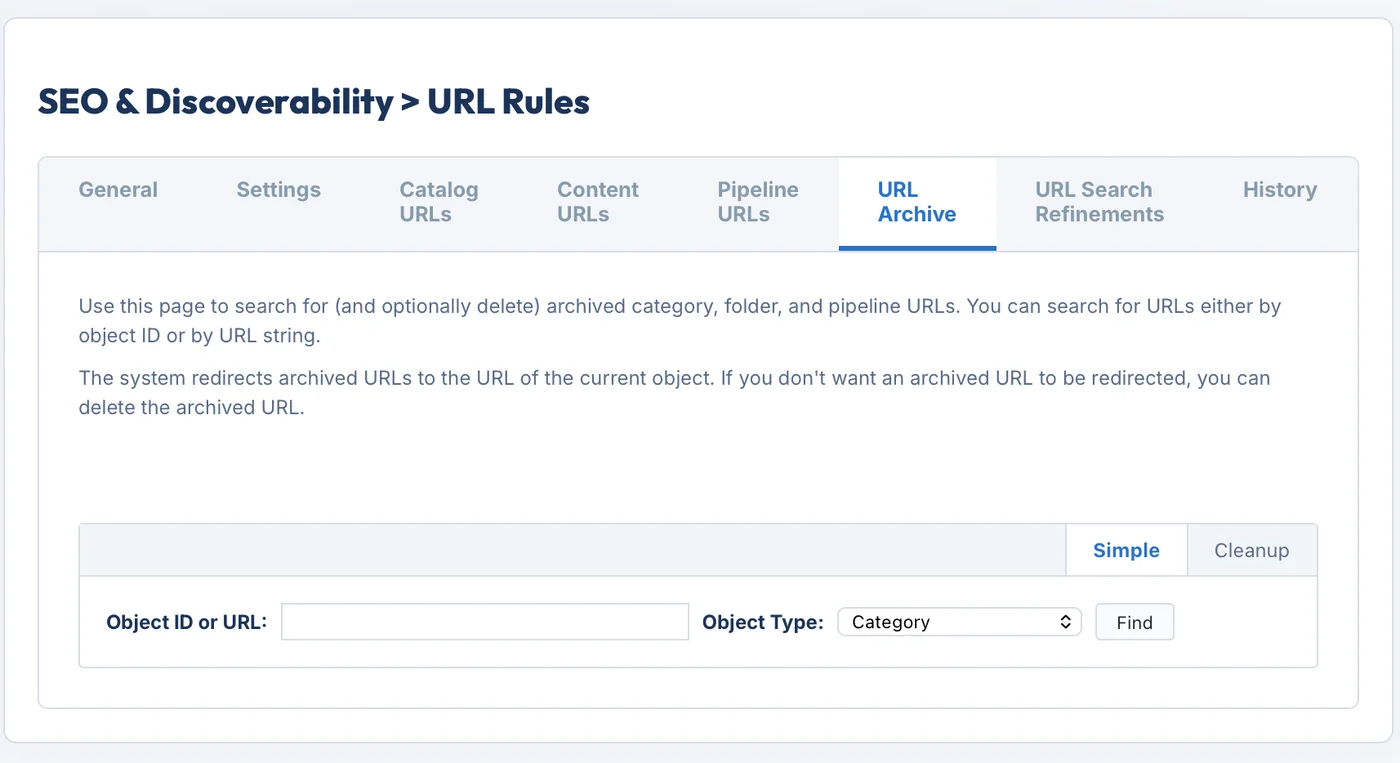
Screen 5: The URL Archive Tab (Cleaning Old Links)
textBM Navigation Path: Merchant Tools > Site > SEO & Discoverability > URL Rules [URL Archive Tab]
- What to do: Search for and delete old, outdated category or pipeline links that are left over from past code deployments or catalog updates.
Screen 6: The URL Search Refinements Tab (Faceted Search Links)
textBM Navigation Path: Merchant Tools > Site > SEO & Discoverability > URL Rules [URL Search Refinements Tab]
- What to do: Manage your faceted filters and take Snapshots to track link changes over time.
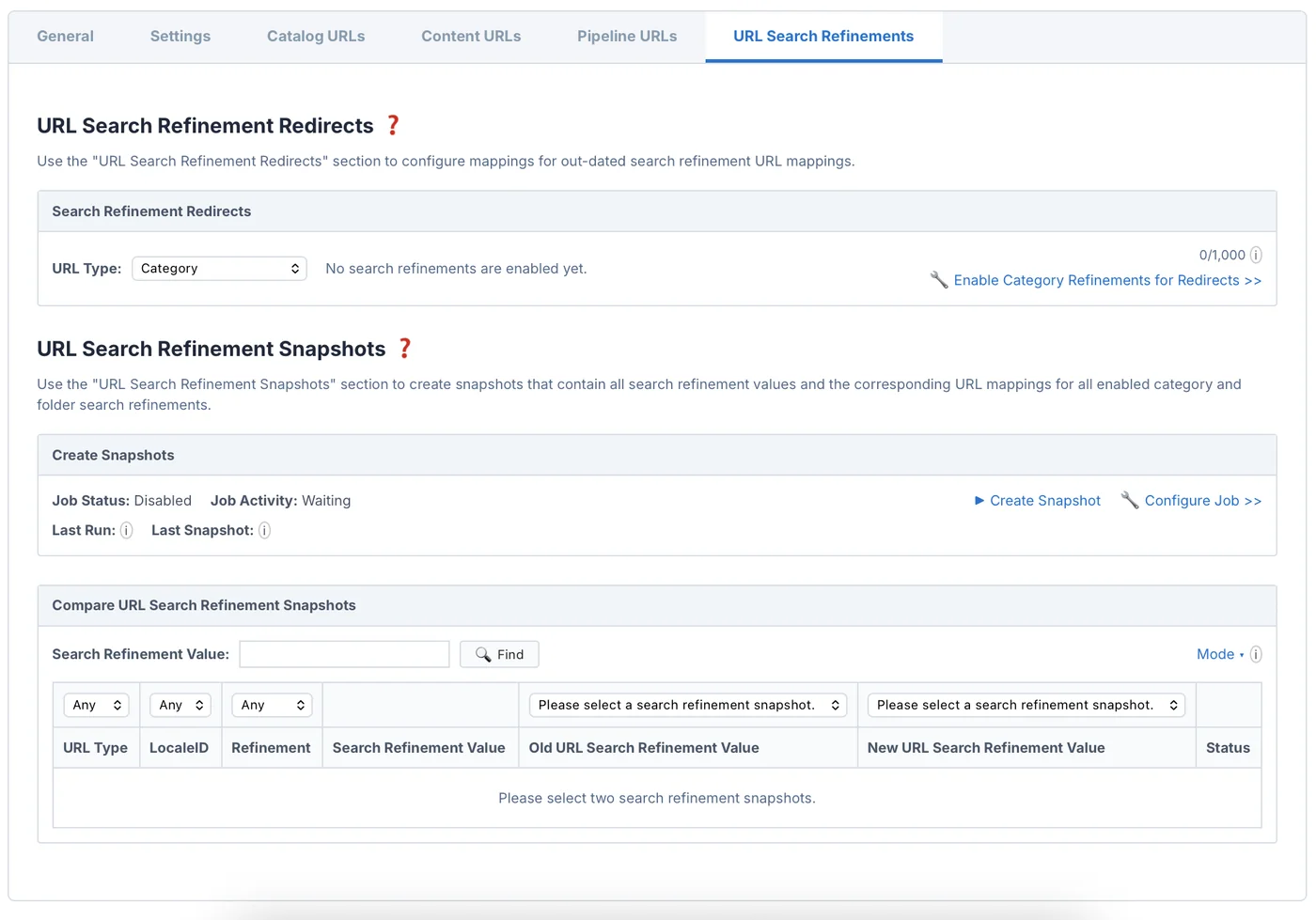
4. How to Write URL Rule Syntax
Writing rules in the Catalog or Content tabs requires using a specific bracketed array format.
Ground Rules for Syntax
- Max Elements: You can combine up to a maximum of 5 different elements in a single rule.
- Allowed Characters: You can only use standard letters, numbers, hyphens (
-), and underscores (_). - The Slash Rule: You can use exactly one forward slash (
/) in a single rule block, and you cannot leave the spaces right next to it empty.
Syntax Logic and Real Examples
Category URL Rules
These rules apply directly to your catalog categories.
textSyntax Input:
[ [ constant, shop ], / , [ category-path, [ attribute, ID ], - ] ]

Final Output:
www.myindiastore.in/shop/appliances-kitchen-mixers/
Product URL Rules
These rules apply to product pages. If you want to include category paths, you must declare category as the source boundary token.
textSyntax Input:
[ [ constant, buy ], / , [ category ], / , [ attribute, name ] ]

Final Output (The system automatically appends the unique Product ID and the .html extension at the end):
www.myindiastore.in/buy/appliances/kitchen/heavy-mixer/MIX789.html
Advanced Syntax Options
- Handling Multi-Value Attributes: If your rule uses a product attribute that has multiple values (like an array of compatible device brands), the platform reads the localized names of all assigned values. It then links them together using your chosen whitespace character (e.g., rendering
/apple-samsung-oneplus/). - Path Exclusion (Trimming the Middle Categories): You can remove middle categories from long paths using the range shortcut
[start, end]. For example, if your full category path ishome > electronics > audio > headphones > wireless, applying[category-path, [attribute, displayName], /, [3,4]]slices out the middle tiers to display a shorter link:www.myindiastore.in/home/electronics/wireless. - Automatic Conflict Fix for Hyphens: If you choose a hyphen (
-) as your product ID separator, but your product name already contains hyphens natively, B2C Commerce will automatically change the separator to a forward slash (/) for that item (e.g., rendering.../noise-cancelling-headphones/HP001.htmlinstead of.../noise-cancelling-headphones-HP001.html). This stops browser routing breaks.
5. How the System Processes an Inbound URL
When a user clicks a link to visit your store, Salesforce B2C Commerce evaluates the incoming text pattern using a strict step-by-step sequence. If a URL is behaving strangely or throwing a 404 error, trace it using this exact workflow:
code[User Enters a Storefront URL] │ ▼ ┌──────────────────────────────────────────────────────────────────────┐ │ 1. Check the Host Alias File │ │ Maps the domain name to the site. Rules are NOT applied yet. │ └──────────────────────────────────┬───────────────────────────────────┘ │ ▼ ┌──────────────────────────────────────────────────────────────────────┐ │ 2. Resolve the Language / Locale Context │ │ Reads the path or parameters to determine the current language. │ └──────────────────────────────────┬───────────────────────────────────┘ │ ▼ ┌──────────────────────────────────────────────────────────────────────┐ │ 3. Match Primary Objects │ │ Checks if it matches an active Pipeline, Folder, or Redirect. │ └──────────────────────────────────┬───────────────────────────────────┘ │ ▼ If no match found ┌──────────────────────────────────────────────────────────────────────┐ │ 4. String Normalization │ │ Applies case-insensitive matching and handles these unencoded │ │ characters automatically: , @ ) ! $ ' (~ │ └──────────────────────────────────┬───────────────────────────────────┘ │ ▼ If no match found ┌──────────────────────────────────────────────────────────────────────┐ │ 5. Check the URL Archive │ │ Scans past replication histories to fire old cached 301 redirects.│ └──────────────────────────────────┬───────────────────────────────────┘ │ ▼ If no match found ┌──────────────────────────────────────────────────────────────────────┐ │ 6. Check Manual URL Redirects │ │ Looks through the Business Manager manual redirect list. │ └──────────────────────────────────┬───────────────────────────────────┘ │ ▼ If no match found ┌──────────────────────────────────────────────────────────────────────┐ │ 7. Fallback to Mapping Rules │ │ Checks Dynamic Pattern Rules first, then Static Asset rules. │ └──────────────────────────────────┬───────────────────────────────────┘ │ ▼ If all steps fail ┌──────────────────────────────────────────────────────────────────────┐ │ 8. Render the Storefront 404 Error Page │ └──────────────────────────────────────────────────────────────────────┘
Path-Based Language Fallback Order
During Step 2 of the process, if you choose to show languages in the URL path, the system figures out the user's language using this exact order:
- It looks for a rule matching the first and second path folders combined.
- If that doesn't exist, it checks a mapping for the first path folder only.
- If that fails, it checks if the first path folder matches a native platform Locale ID.
- If everything fails, it routes the shopper to your global
defaultlanguage.
6. Managing Redirects and Platform Limits
When moving an old website to B2C Commerce or updating category paths, you must choose the right feature to handle redirects.
code[Inbound Redirect Request] │ ┌─────────────────────────┴─────────────────────────┐ ▼ ▼ [B2C Commerce Platform Source] [Legacy Platform Source] │ │ ┌──────────┴──────────┐ ┌──────────┴──────────┐ ▼ ▼ ▼ ▼ [Host-Only Request] [Obsolete Core Path] [Conforms to Pattern] [Unique/Unusual Asset] │ │ │ │ ▼ ▼ ▼ ▼ ┌─────────────────┐ ┌─────────────────┐ ┌─────────────────┐ ┌─────────────────┐ │ Hostname Alias │ │ URL Redirects │ │ Dynamic Mapping │ │ Static Mapping │ │ (Aliases Module)│ │ (Only option for│ │(Uses wildcards │ │ (Specific paths;│ │ │ │ native changes) │ │ like * and **) │ │ Max 2MB file) │ └─────────────────┘ └─────────────────┘ └─────────────────┘ └─────────────────┘
Features and Strict Limits
1. Hostname Aliases
- What it does: Handles core domain changes and device- or language-specific routing.
- Rule: Requires a live DNS setup pointing to your storefront production servers.
2. URL Redirects
- What it does: Maps old, deleted, or renamed native B2C Commerce links to active ones.
- Quota Limit: Strict hard limit of 25,000 links per site.
3. Dynamic Mappings
- What it does: Maps pattern-based links from an old external website into B2C Commerce using wildcards (
*or ``) and positioning tokens like{0}. - Quota Limit: Capped at around 18,000 (18K) links per site.
- Limitation: Can only process link types arriving from an external legacy non-B2C website. It cannot map native B2C links or static media files like product images. Wildcards cannot read query strings or URL parameters.
4. Static Mappings
- What it does: Redirects specific, unique legacy URLs to standalone files or pipelines.
- Quota Limit: Capped at around 18,000 (18K) links per site.
- Limitation: The physical text configuration window in Business Manager cannot exceed 2 MB. If your upload file size is larger than 2 MB, you must use the standard site import/export tools instead.
Banned Keywords
The platform reserves the specific string sitemap*xml for automatic system engines. You are completely blocked from using this string inside any custom redirect module. However, generic human-facing links can safely use sitemap or SiteMap.
7. Customizing Search Refinement Links (Faceted Navigation)
Putting filter terms (like size or color) directly into the URL path gives your products better visibility on Google, but you must stay within platform boundaries.
Refinement Configuration Limits
- Site Cap: You can set up a maximum of 30 active search refinements across your entire store.
- Category Cap: A single category node or folder node can have a maximum of 5 active search refinements.
Delimiter Configuration Settings
To separate category terms from filter choices cleanly, developers configure three distinct delimiters on the Settings tab:
| Delimiter Target | Purpose | Choices |
|---|---|---|
| Refinements Segment Delimiter | Separates the main category path from the filter choices block. | Forward Slash (/), Underscore (_), Hyphen (-) |
| Refinements Delimiter | Separates different filter types from each other. | Forward Slash (/), Underscore (_), Hyphen (-), Period (.), Plus (+) |
| Refinements Value Delimiter | Separates multiple values within the same filter type. | Pipe (│), Underscore (_), Hyphen (-), Period (.), Plus (+) |
Automated Snapshots
To trace your search links and avoid unexpected duplicate URLs, use Snapshots on the URL Search Refinements tab.
- Automatic Creation: B2C Commerce automatically compiles up to 2 snapshots immediately after every search index replication.
- Manual/Scheduled Cap: You can schedule a maximum of 5 custom snapshots over time.
- Analysis Modes: Compare snapshots using four system filters: Equal, Added, Removed, or Changed. Modified links get a green checkmark icon in BM, and their rows are safely locked from accidental editing.
Smart Crawler Blocking Strategy
Deep filter combinations can create massive crawl path loops that waste Google's time. To stop crawlers from loading unhelpful filter combinations while keeping premium categories indexed, insert a path constant and block it.
textGoal: Block search bots from crawling deep "Size" filter loops.
How to Set a Refinement Block
-
Find the Refinement Node: Business Manager Action. Go to the Catalog URLs tab under URL Rules and click Edit Refinements.
-
Inject a Custom Token: Business Manager Action. Select your target language (Default) and choose the size filter. Click Create Constant and input a unique text string (e.g.,
123). This token injects itself into the URL path only when that filter is loaded. -
Open Your Robots Asset: Code Update. Open your store's live
robots.txtconfiguration file inside your code editor. -
Apply the Crawl Exclusion: Code Update. Add the explicit exclusion parameters to stop search bots at that token level:
User-agent: *, Disallow: /123/*
8. Deployment and DevOps Replication Workflow
Moving your URL configurations safely from your Sandbox instance to a live Production environment requires following a strict environment promotion pipeline.
Rules for Redirect Processing Priorities
When multiple manual or wildcard redirect rules overlap, B2C Commerce processes them using this strict priority chain:
code[Incoming URL Evaluated] │ ┌────────────────────────┴────────────────────────┐ ▼ ▼ [Exact Non-Wildcard Match] [Wildcard Matches] (Runs first. The system evaluates (Runs next. Strictly sorted by rules with MORE parameters first.) the priority position assigned │ in Business Manager.) ▼ │ ┌────────────────────────┐ ▼ │ All parameters must │ ┌────────────────────────┐ │ match exactly. Extra │ │ Sorted Low to High │ │ URL parameters are │ │ (Integers 1 to N). │ │ safely ignored. │ │ Blanks run dead last │ └────────────────────────┘ │ in an undefined order. │ └────────────────────────┘
Avoid the Infinite Redirect Loop Trap
If your store does not show languages in the URL path (meaning your storefront locale mapping is set to none), creating a redirect where the source URL is contained inside the destination string creates a dangerous bug:
text🚨 The Loop Trap:
Source URI: '/home'  --->  Destination URL: '/new/home'
Because the system runs fallback checks with and without language codes, it will misinterpret the new path folder new as a language code. This triggers an infinite processing loop (Redirect Loop). Make sure your destination paths do not embed your source strings exactly.
Pre-Launch Checklist: Launch Readiness Check
Before deploying your site live to Production, audit your Business Manager instance against this checklist:
- The Multi-Catalog Rule: You must have at least two catalogs: a product catalog that owns the items, and a storefront catalog that handles categories. The storefront catalog must be assigned to the site, but it must not own products natively.
- Active Pricing: Check that at least one price book exists, is assigned to the site, and is actively turned on.
- Unique Instance Aliases: Every storefront site in every environment instance must have a completely unique hostname alias. If multiple sites inside the same instance use a shared path format (like
/Sites-FirstStore-Siteand/Sites-SecondStore-Siteon the same domain), it is impossible to run or validate mapping rules.
Environment Deployment Blueprint
Because the background URL generation job cannot run on Production, developers must push settings through the pipeline using this multi-instance deployment sequence:
code┌──────────────────────────────────────────────────────────────────────┐
│ Phase 1: Sandbox Testing Isolation                                   │
│ Write, refine, and preview all your rule syntaxes and space choices  │
│ safely inside a standard Sandbox instance.                           │
└──────────────────────────────────┬───────────────────────────────────┘
                                   │
                                   ▼ Export "Site URLs" payload xml
┌──────────────────────────────────────────────────────────────────────┐
│ Phase 2: Staging Import and Verification                             │
│ Upload components under Administration > Site Development. Validate │
│ that the background generation job completes its 3-minute indexing. │
└──────────────────────────────────┬───────────────────────────────────┘
                                   │
                                   ▼ Set Staging instance to "Staging" in rules
┌──────────────────────────────────────────────────────────────────────┐
│ Phase 3: Disable Old SEO Support Links                               │
│ Uncheck "Enable Search Friendly URLs" on the old Search Support page │
│ to prevent old, messy configuration files from exporting later.      │
└──────────────────────────────────┬───────────────────────────────────┘
                                   │
                                   ▼ Run site data Replication Job
┌──────────────────────────────────────────────────────────────────────┐
│ Phase 4: Replicate Dual Data Groups to Production                    │
│ System operators must simultaneously select BOTH the "Catalogs"      │
│ and "Libraries" replication groups to move rules to Production.      │
└──────────────────────────────────┬───────────────────────────────────┘
                                   │
                                   ▼ Manual Post-Launch Production Step
┌──────────────────────────────────────────────────────────────────────┐
│ Phase 5: Rebuild the Production XML Sitemap                          │
│ Sitemaps do not replicate. You must manually regenerate your XML     │
│ sitemap on Production to index your newly deployed live links.       │
└──────────────────────────────────────────────────────────────────────┘
9. Common Mistakes Developers & Merchandisers Make
Avoid these common slip-ups to keep your storefront mapping framework healthy:
Merchandiser Mistakes
- Delimiter Overlap: Merchandisers often use hyphens (
-) or underscores (_) within the actual names of products or category display titles while using those same characters as delimiters for search filters. This breaks URL parsing and pollutes the conflict log with false alarms. - Folder Rules Conflicts: Setting up explicit rule patterns for content folders can cause system routing bugs if those folders use names identical to site categories (e.g., a folder named
saleconflicting with a product category namedsale). Best Practice: Leave folder rule syntax completely blank, and optimize individual content assets instead. - Hardcoded Content Links: Pasting static, unoptimized URLs to product pages inside content text blocks or promotional banners will break into 404 paths once the URL Rules module is activated. Always generate content page links dynamically using standard platform scripts like the
URLUtilsAPI.
Developer Mistakes
- Invalid JSON in Alias Files: The B2C Commerce hostname alias file supports custom formats (like using equal signs
=or leaving trailing commas after host entries) that break strict JSON formatting rules. Developers often paste this code into standard debugging tools, causing validation crashes. Correction: Strip comments, change equal signs to colons, and remove trailing commas before checking code in validators like JSONlint—then remember to restore the commas before saving in Business Manager. - Redundant Custom SEO Coding: Writing custom script files or pipeline logic blocks to generate short URLs manually is unnecessary and breaks the native engine. If the standard platform architecture is followed, the URL Rules module requires zero custom coding modifications to execute perfectly.
- Production Search Index Oversights: Leaving full search index rebuild schedules active on live Production instances slows down site response speeds. Always build your search indexes on Staging, replicate the finished indexes over to Production, and completely turn off index rebuild tasks on your Production environment.
References
- URL Rules URL Syntax
- URL Rules for SEO
- URL Generation and Conflict Resolution for B2C Commerce
- Preview and Resolve Conflicts
- Use the SEO URL General Tab
- Use the SEO URLs Settings Tab
- Use the URL Archive Tab
- Configure SEO URL Search Refinements
- Configure SEO URLs
- URL Evaluation and Resolution
- URL Evaluation and Resolution for Legacy Search-Friendly URLs
- URL Redirects for B2C Commerce
- URL Redirect Processing and Examples for B2C Commerce
- Configure URL Redirects
- URL Rules Object Import/Export in B2C Commerce
- Configure Hostname Mapping Rules
- Review Business Manager Settings
- Explore Search Engine Optimization
Test your knowledge
Quiz1. A developer enables the 'Lower Case' setting in the URL Rules module to prevent duplicate content flags on Google. How does this impact the appearance of Product IDs in the final storefront URLs?
2. The background system job responsible for regenerating category and folder URLs takes about 3 minutes to process 50,000 nodes. On which instance type is this background job completely blocked from executing?
3. When writing custom rule definitions in the Catalog URLs tab, what is the maximum number of structural elements allowed inside a single rule expression?
Savan Koradia
Architect & FounderCEO & Founder of AakarDev Softwares • Salesforce B2C Commerce Architect
Hands-on engineer sharing practical, experience-driven insights on Salesforce Commerce Cloud architecture, technical debt, cartridge health, and platform decisions from real production work.
Related Articles
Did You Know? Disallow Doesn't Remove an Indexed Page
Adding a URL to robots.txt does not automatically remove it from Google’s index.
Did You Know? robots.txt is Not a Security Mechanism
robots.txt can tell bots what not to crawl—but it cannot stop them from directly requesting a page.
Did You Know? Dynamic Mappings Exclusively for Legacy
Dynamic Mappings are engineered exclusively for legacy non-SFCC links arriving from external platforms during a migration.